
Version 2.5.0 (Jul 2026)
Release Date: 14.07.2026
New Features
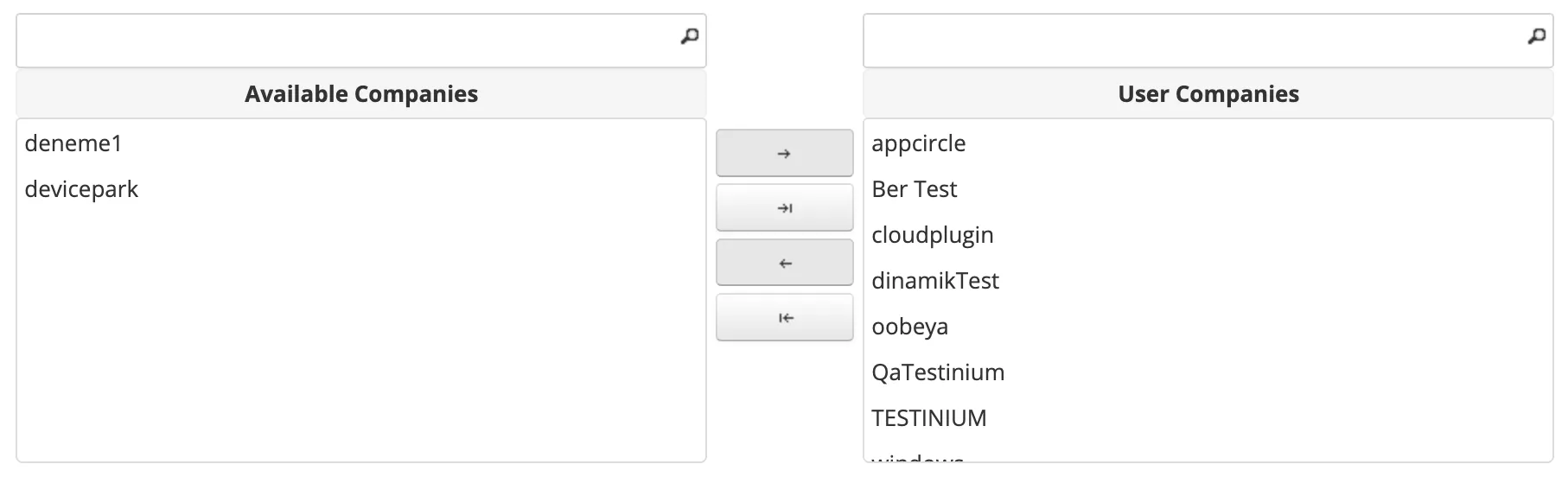
- Enhanced Authorization Security Enhanced product security by improving the authorization flow for admin users with access to multiple companies. This update ensures that cross-company permissions are validated and managed in a more controlled way, helping prevent unintended access and strengthening the overall security of admin-level operations.
- Additional note: As part of this enhancement, company-level access for admin users is now managed through explicit authorization. From Users > Edit User, admin users can be assigned to the companies they are allowed to access, ensuring stronger control over cross-company permissions and reducing the risk of unintended access.
-
- Appium 1 to Appium 2 Migration Support Added Appium 1 to Appium 2 migration support. This feature allows users to migrate existing Appium 1 projects to the Appium 2 structure without manually recreating their project, scenario, and plan configurations, enabling a faster and more controlled transition process. Users can access this feature from the Projects page's table list by selecting the upgrade action for the Appium project they want to migrate. Documentation is available here.
Improvements
- Custom Date Range for Pie Chart in Dashboard Added custom date range support for the pie chart graph on the Dashboard. Users can now view test run minute data for a selected specific date range, in addition to the predefined time filters.
- Timeout Status Support for Rerun Added Timeout status support to the Rerun feature. Test results with the Timeout status can now be included and used within the rerun flow.
- Execution Metadata Access in Test Automation Code Execution metadata values such as EXECUTION_ID, TEST_RESULT_ID, and SCENARIO_ID are now accessible from test automation code during execution. Built-in Environment VariablesDocumentation Link
Bug Fixes
- Report Environment Listing Fix Fixed an issue where selecting the “List by Environment” checkbox on the Test Execution Report page caused a 500 error.
- All-in-One Plan Edit Field Display Fix Fixed an issue where the Parallel Test Limit and Failed Test Retry Count fields did not appear correctly when editing a plan with the All-in-One option selected. These fields now remain visible with their mandatory values and are displayed as disabled.
- Appium 2 Rerun Environment Display Fix Fixed an issue in the Appium 2 rerun flow where the scenario name was displayed repeatedly instead of the related environment information. The rerun details now correctly display the environment information.
- Project Sync Pagination Improvement Fixed an issue with the Project Sync page where the page flow could be disrupted when a large number of sync records were listed. Pagination support has been added to provide a more stable and manageable viewing experience.
- Appium Plan Device OS Validation Fix Fixed an issue with Appium project plans where newly added devices were not saved after clicking “Save” when the device OS version did not match the uploaded app’s OS version. The system now displays a warning when there is an OS version mismatch, and valid device selections are saved successfully with the expected navigation after saving.